There are a lot of annoying parts of a corporate job. One that I deal with on a regular basis is the software. In your personal life you get to pick the software you use based on how well it works and how easy it is to use. In the corporate world the software is chosen for you, and you are forced to use it. Unfortunately, this is often used as an excuse for bad corporate software. I have been in rooms where someone has said something like “it doesn’t work very well, but they’ll use it because they won’t have a choice.” The goal of most software in a corporate setting is to serve as a “system of record” for the company, a single place where everyone in the company or department can see and use the same information. The benefit is for the company as a whole, not necessarily for you as an employee.
Because of this, corporate software is often confusing, hard to learn, and hard to use. It is more like a machine than good software: there are a lot of buttons to press and data to input, and you have to remember exactly the right steps to get it to work properly. To enter data for a new job posting, your quarterly goals, or an expense report, you have to figure out how to translate the information into the format the software requires, then perform a series of mouse and keyboard actions in order to enter that formatted information into the software. Some software is easier to work with than others, but all software forces you to conform to its structure and constraints: to become more like a machine in order to work with the machine.
Machines are ideally used in situations where the job that needs to be done is inhuman. This can be because of scale, like a crane lifting beams too heavy or too large for a human, or because of accuracy at speed, like machines on an assembly line that have to perform the same task correctly over and over again. Machine environments often make the jobs within them inhuman: like when I worked in a chocolate factory and spent eight hours a day putting bags of chocolate into a box. Making chocolates is a human activity. A mechanical task inside a chocolate factory is not. That is a task better suited for another machine.
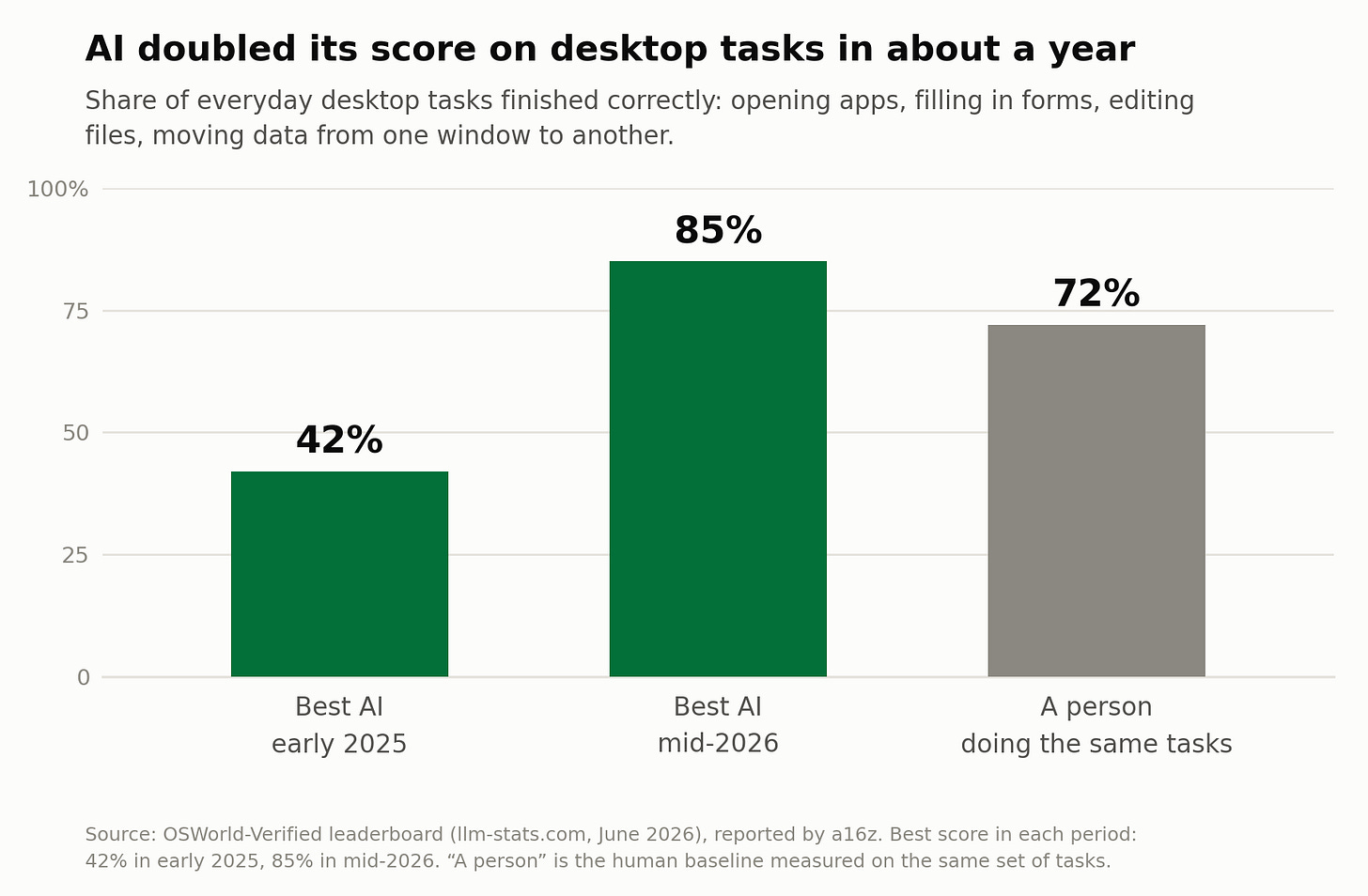
In the world of corporate software, LLMs can be that machine: the machine that does the mechanical tasks in an otherwise inhuman environment. LLMs have been trained to use a web browser and have gotten remarkably good at it; there’s been a dramatic improvement in their performance in this area since early 2025. I have been experimenting with using LLMs to complete a number of browser-based tasks at work, tasks that are purely mechanical. The LLM isn’t generating text on my behalf; it’s taking text that a human wrote and performing the clicks and keyboard actions to enter the information into a software system. I no longer have to conform myself to software; software (the LLM in this case) conforms itself to me. Let me walk you through a few examples.
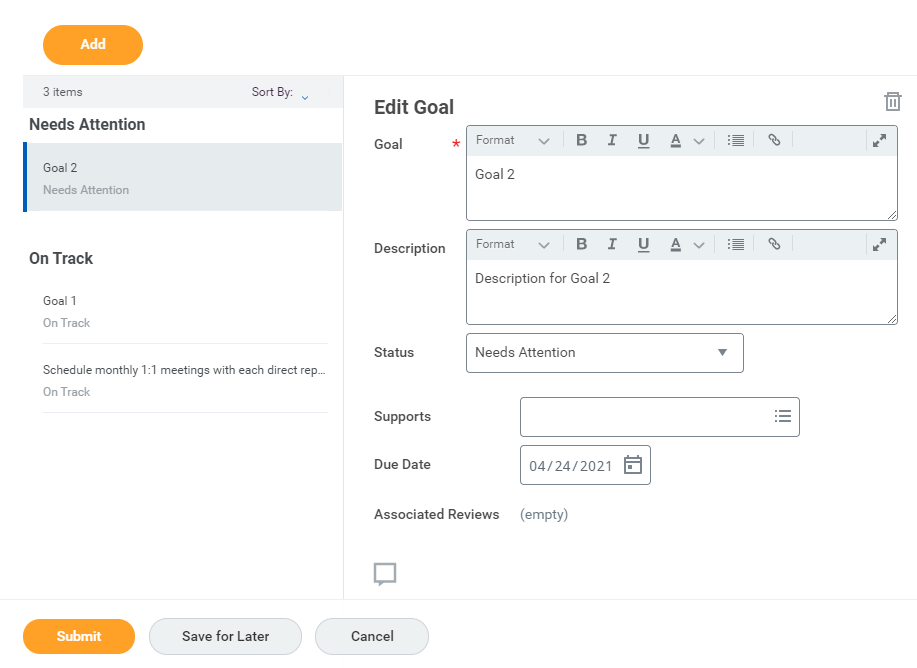
Yearly/Quarterly Goal Setting
Regardless of the system the company is using to store and track goals or who my boss is, the process of goal setting and review always works the same way:
You write/review/provide updates on your goals in a Word doc
You send it to your boss for review
You meet with your boss to discuss and get feedback
Repeat steps 1-3 in the Word doc and email until you agree
Enter the information into the actual software system where goals are stored
Your boss goes to the system and clicks “approve”
The best software for this work is a document, but the IT systems in most companies expect it to be transformed into a structure that works best for the system. So you have to copy and paste, click a bunch of times, and try to remember how to use the software since you only touch it once or twice a year. Or you can give the doc to an LLM and it does all that for you.
Project Plans/Tasks
I have a theory that every single project plan or task tracker actually exists in Excel, and part of a project manager’s job is to learn whatever the project/task management software of the moment is and keep it in sync with the Excel file. They also need to sync weekly update slides and other project documents with the real source of truth: the Excel file. Good project managers have better things to do than click, copy/paste, and fiddle with PowerPoint versions of project plans. LLMs can do all of that if you just give them the Excel file.
Expense Reports
Expense report systems seem to be designed to punish you for spending the company’s money. Why do you have to click so many times? Why are the receipt images so small? How do I fill out this type of expense so that I don’t get yelled at? Thankfully, if you give an LLM some up-front guidance it can do all the clicks, itemization, and receipt matching for you. You might need to track down a copy of the expense policy or answer some questions about who attended a group meal, but it’s a lot less painful than doing it yourself.
Forms
Unfortunately, trying to get things done at a large company often requires you to fill out a lot of request forms. These forms try to capture all the relevant information about your request to help the team who will do the work prioritize it appropriately. The result is a multi-page form with somewhere around 30 fields to fill out. I will leave the discussion of whether or not you should have an LLM generate the responses for another time, but even if you just use the LLM to perform the actual clicks it saves a lot of time and frustration. One thing I have found helpful is to have the LLM capture the form into a doc, fill out the doc version of the form myself, then give the doc back to the LLM to actually fill out the form. Docs are also easier to share if you’re working with a group of people on the information needed to fill out the form.
I’m sure you can come up with other examples for your own work or home life based on the ones I shared. I would encourage you to give it a try the next time you have a task where you have to mechanically enter something in a piece of software. If you’re looking for more specific details on how to do it, take a look at the footnote1.
The question of whether to use an LLM, and if so when it should be used, is controversial. I don’t advocate for using LLMs to take actions on your behalf lightly. But in this case, remember that AI is a machine. At their best, machines are built to do tasks that are inhuman. Unfortunately, entering data into “system of record” software is often an inhuman task. In some cases there are trained teams of people who not only enter the data but manage it and make it useful: a very human job. But in other cases the mechanical job of data entry into a piece of software is distributed across the organization. It gets pushed onto people who have other, more human tasks to do. You are forced to act like a machine to transform information into a form that the software can accept. Next time you feel like a machine, try having a machine do the work instead. Let machines do the inhuman tasks while you focus on the human ones.
-
Unfortunately it’s not yet as easy as it should be to give it a try. Here’s a few options depending on what LLMs your company provides or you pay for yourself.
ChatGPT (Recommended if none of the others work for you)
If you are not sure what you have access to through your company and you don’t pay for any LLM personally then ChatGPT is the way to go. You may be able to do it with a free account if you just want to experiment (OpenAI’s docs list computer use as a paid feature, but it worked on mine). You’ll have to walk through the process on this page to install the desktop app and the Chrome extension. Then you’ll have to enable Google Chrome under the “Computer use” section of the settings menu. It’s pretty clunky, but it’s worth a try. If you want ChatGPT to do something for you then choose the “Work” tab on the home page and give it your instructions. It will open a tab in your Chrome browser and do the work.
Google Gemini
If your company uses the Google suite, you may already have access to “Gemini in Chrome”, but you’ll need a feature called “Auto Browse” if you want the LLM to take actions for you. You will probably have to request access from IT to get Auto Browse. Once it’s enabled you can give your instructions inside the Gemini in Chrome sidebar in your Chrome Browser.
Microsoft Copilot
If your company uses the Microsoft suite then you have access to some version of Copilot. If you want to use browser automation you’ll need access to Copilot Cowork. If you don’t then you’ll have to request access from IT. If you do then you can give it instructions in Cowork on the web and it will open a hidden tab in the copy of Edge on your machine to do the work for you. Edge has to be installed and signed in with your work account, but it doesn’t have to be your default browser.
Claude
If you or your company are on a paid Claude plan then you can use the “Claude in Chrome” extension (I use it in Edge regularly, though Anthropic only supports it in Chrome). Just give it instructions and it will perform them with your approval. Claude Cowork just got a browser embedded into it, so that will also work if you don’t want to bother with the extension.
In short, it’s a bit of a mess. But I expect these tools to become more accessible now that LLMs can consistently use a browser without mistakes. ↩